
recurring tasks
Recurring tasks are one of groovmint's most powerful features. The system is built to handle complex, real-world schedules that Notion's built-in recurrence can't manage - and it does it without requiring any third-party plugins or losing your history of tasks completed.
How recurring works
groovmint's recurring task system handles leap years, short months, and complex business day shifts without breaking a sweat.
Unlike a simple task reset methods, groovmint creates a brand new, independent task for every new recurring task. This means your completed task history is preserved exactly as it happened, with the next task in the sequence ready and waiting with its own correct date.
There are two ways to create a recurring task:
Automation
Once a recurring task is set up, the system handles everything:
- When you press DONE on a recurring task, groovmint automatically creates the next task in the sequence with the correct next deadline date
- The sequence ends automatically when it reaches your Stop Recur date - no manual clean-up required
- The automatic creation of a recurring task does NOT require any third-party tools
Manual control
You also have the option to create the next recurring task yourself at any time, without waiting to press DONE:
- Press the Create Next Recurring button to generate the next task in the sequence immediately
- Ensure that when pressing the Create Next Recurring button to do so on the last recurring task of the sequence.
- Manual control means that you can create recurring tasks into the future so you can see them on your calendar ahead of time.
- Here's the clever bit: You can create manual recurrences whenever you like. When you mark a task as done that already has a manually created recurrence ahead of it, groovmint is smart enough not to create a duplicate. It detects that the next task already exists and skips the automation. The manual and automatic approaches work together seamlessly, ensuring you are always in control.
Guided instructions
Tasks have a built-in Instructions system to guide you through the recurring task setup. It instructs you on what to do next, or flags what's missing if you try to create the next recurrence manually before the setup is complete. If something isn't quite right, the Instructions field will tell you what needs fixing before you continue.
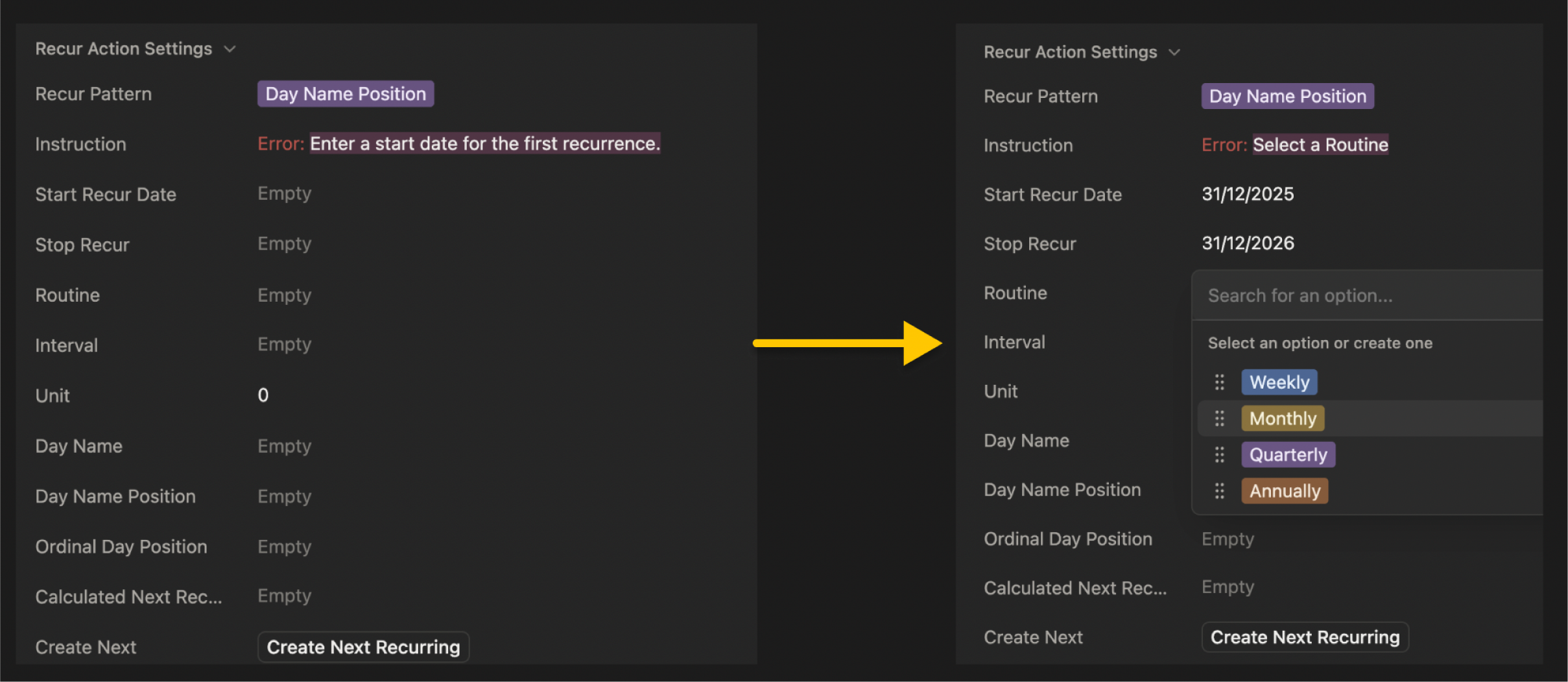
The four recurring patterns
groovmint offers four patterns to calculate virtually any real-world scheduling need. Select the pattern that matches what you want, and the Instructions field on the task will guide you through filling in the remaining settings.
Pattern
Ideal for...
Day Name Position
Great for: Meetings and appointments on specific weekdays. e.g. The second Friday of every month, or The first Monday of the second month of every third quarter.
Precise control using day names rather than numbers: Day Name (e.g. Tuesday) and Day Name Position (e.g. Second) for the second Tuesday of the period. If you choose "Last" day position, the system will find the very last occurrence of that day name in that month, whether it's the 4th or 5th one.
Day Position
Great for:. Repeated position in a period not bound by a day number of name. e.g.The last business day of the quarter. (when Business calendar selected)
Those tasks that aren't tied to a specific date, but rather a spot in the calendar. If you use the Business days calendar it even knows to skip weekends. This is where you set using Ordinal Day Position.
Precise Days Between
Great for: Following up every 10 days, or a 45-day check-in.e.g. Every 45 days (calendar days only)
Custom intervals that don't fit standard patterns. Just tell the system how many days to jump forward in the Unit box.
Same Day Number
Great for: Rent, subscriptions, or anything that always happens on the day number you set e.g. The 15th of every second month of every quarter
Simply using the the same day number as your start date for future recurrances. If you start on the 31st and the next month only has 30 days, the system will land on the 30th instead of skipping it.
Get to know the settings
Setting up a recurring task is like giving the system a set of rules to follow. Here are the main things you'll interact with:
Setting
Required for...
Instruction
This is your helpful assistant. If you forget to fill something out, it will pop up with a friendly reminder of what's missing (like "Select a Routine Position").
Start recur date
This is the date of the first task to base future recurring tasks from.
Stop recur
If your task has an end date (like a 6-month project), put it here. If not, just leave it empty.
Routine
How often does this happen? Weekly? Monthly? This sets the general rhythm.
Interval
Use this if you want to skip periods. For example, a monthly routine with an interval of "2" means the task happens every second month.
Unit
Use this if you want to skip periods. For example, a monthly routine with an interval of "2" means the task happens every second month.
Day name
Used to select the day of the week you're targeting (e.g., "Monday" or "Friday").
Day name position
Used to select the day of the week you're targeting (e.g., "Monday" or "Friday").
Ordinal day position
This is for when you aren't looking for a specific day name, but rather a position in the calendar, like the "First day," "Last day," or even the "Middle day" of the period.
You don't need to understand the calculations. Just pick the pattern, follow the Instructions field, and groovmint handles the rest.